Introduction: A temperature profile turns bottom preheating from a single dial setting into a timed sequence, and understanding how that sequence works makes a programmable preheater far easier to judge.
Anyone moving from a fixed-temperature hot plate to programmable preheating meets the same confusion: the hardware looks similar, but the working idea has changed. On a fixed plate you pick a number and wait. With a programmable platform you describe how the board should warm up over time, then let the controller follow that description while it reads temperature back from the board. That shift explains why the useful questions change from "how hot does it get" to "what does a sequence look like, and where is it written down." The sections below explain the concept, show how programmable control links a profile to the heater, and point to the software and manual entries that carry the operational detail.
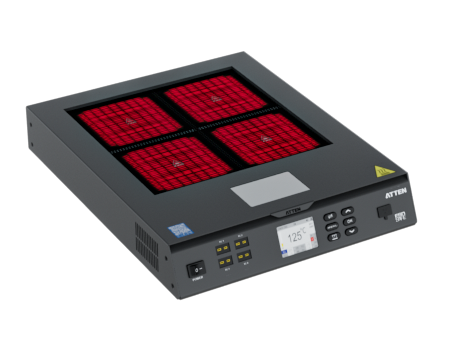
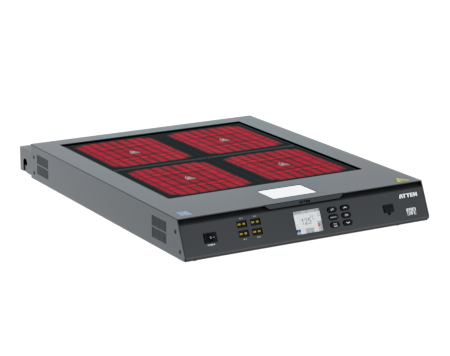
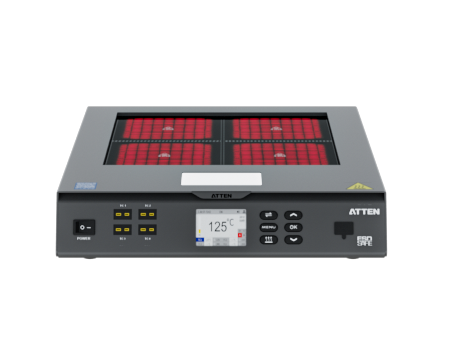
A temperature profile is a description of the board's temperature over time rather than a single target the heater holds. That distinction matters because a PCB is not thermally uniform: ground planes, thick copper pours, large connectors, and shielded areas soak up heat slowly, while thin outer areas respond almost immediately. Set one surface temperature and walk away, and the bottom of the board may sit at that number while the joints and component bodies are somewhere else entirely, with the size of the gap decided by the board rather than by the setting. A profile gives the process a shape so those differences are handled deliberately instead of accidentally. The shape usually includes a rise, a period of holding, and one or more steps toward a working level, and each part does a different job. A controlled rise limits the thermal shock that comes from dropping a cold assembly onto a hot surface; a hold lets heat spread through copper and laminate so the board catches up with the heater; later steps bring the assembly to the level where top-side soldering or desoldering becomes predictable. Experienced process people also allow for lag, because a board keeps absorbing heat after the heater stops climbing, so the profile has to account for what happens between steps and not only at them. That is the concept behind the wording used for equipment such as the ATTEN ST-7242, described as a programmable four-zone preheater. "Programmable" points at the ability to define that progression; "four-zone" points at how the heating area is arranged. Neither phrase tells you the exact shape a specific board needs, because that depends on the assembly in front of you. What the category does tell you is that the machine is built to follow a described sequence rather than only hold a number.
In a programmable PCB preheater, the controller is the bridge between the written idea and the physical heater. It holds a defined progression, compares the temperature it reads against that progression, and adjusts heating output to stay on track. Without that loop, a profile is only a drawing on paper; with it, the same board can be run the same way twice, by different operators, on different days. The rest of this section looks at the two ideas that make the loop work: sequence and feedback.
A setpoint is a single destination. You tell the heater to reach a temperature and hold it, and everything about how the board got there is left to physics. A sequence replaces that with a small list of states, each carrying a temperature and a time, so the ramp becomes something the operator chooses rather than something that happens. The practical difference shows up in repeatability: two people running the same board on a single-setpoint plate can produce noticeably different ramp behavior simply by loading the board at different moments, while a sequence removes most of that variation. It also changes how you think about the heater's job. The machine is no longer asked to be hot; it is asked to be at a particular point in a plan at a particular moment.
A sequence only means something if the controller knows the actual temperature, and in PCB preheating that reading normally comes from a thermocouple touching the board. A thermocouple works because two dissimilar metals joined at a point produce a small voltage that rises with temperature, and Fluke's temperature measurement guidance explains the same principle plus the cold-junction reference needed to turn that voltage into a number you can trust. Because the sensor sits on the assembly, the controller follows board temperature rather than heater surface temperature. A training scenario makes the point without any equipment claim: run one board at a single set temperature, then run a similar board through a three-state sequence, taping a K-type bead to the surface and watching the readout trail behind the heater by a minute or more. The lag is the lesson. The ST-7242 ships with four K-type thermocouple test sensors, so the same idea extends to several points on one board or one point per zone.
The programming steps, the number of states a sequence can hold, and the thermal limits of a platform are operational details, and they belong in the software and the manual rather than in a short product description. For the ST-7242, the download entries include Atten Tool V2.4 and a shared ST-7322 & ST-7242 User manual. It helps to see what each file type is for: a software tool is where a sequence is authored, saved, and sent to the machine; the manual is where machine behavior, zone conventions, sensor connections, and safety notes are explained; a specification table answers a different question again, usually about physical limits. Treating the software and manual as resource entries rather than as public specification tables keeps expectations realistic, because they are the place to learn the sequence, not a substitute for a datasheet. The shared manual deserves a note of its own. One document covering both the ST-7322 and the ST-7242 means a reader has to match the section to the model on the bench rather than assume every paragraph applies. That is normal for related models in a family, and it is exactly the kind of thing you settle in the first ten minutes with the file open. It also explains why the public description of the platform stays at the level of "programmable four-zone preheater": granular settings belong in documents that can be updated as firmware and procedures change. Anyone comparing what a preheater manufacturer provides will find that a named software tool plus a named manual is a practical sign that the control concept is documented rather than improvised. For a reader trying to understand the topic rather than buy immediately, the useful habit is to read the software and the manual as a pair. The manual tells you what the platform expects; the software shows how a profile is expressed in practice. A question worth raising with any preheater supplier is simply which file covers which model, because that answer decides where the real detail sits.
Programmable preheating becomes clear once you separate three things: the profile as a time-based description of board temperature, the control loop that follows it using thermocouple feedback, and the software and manual entries where the sequence is actually written and explained. The first is a way of thinking about heat across a board, the second is what makes that thinking repeatable, and the third is where the specifics live. Anyone evaluating a platform such as the ST-7242 can start from the published facts, then move to Atten Tool V2.4 and the shared ST-7322 & ST-7242 manual for the operating detail.
A: It is a description of how a board's temperature should change over time, usually written as a short sequence of temperature and time states rather than one fixed setting. The profile gives the heater a plan to follow, so ramp, hold, and step-up behavior stay consistent across boards and across operators.
A: A K-type thermocouple on the board produces a small voltage that corresponds to temperature, and the controller converts that reading and compares it with the profile before adjusting heating output. Because the reading comes from the assembly rather than the heater surface, it reflects what the board is actually experiencing, including thermal lag as heat spreads through copper and laminate.
A: Both appear as download entries connected to the ST-7242 listing, alongside a product video. Atten Tool V2.4 is the software entry and the ST-7322 & ST-7242 User manual is the document entry, shared across the two four-zone models. Read them together and match manual sections to the model in use.
Temperature & Thermometer Resources | Fluke
Two Ways to Measure Temperature Using Thermocouples | Analog Devices

Copyright © 2025 SHENZHEN ATTEN TECHNOLOGY CO., LTD All Reserved.